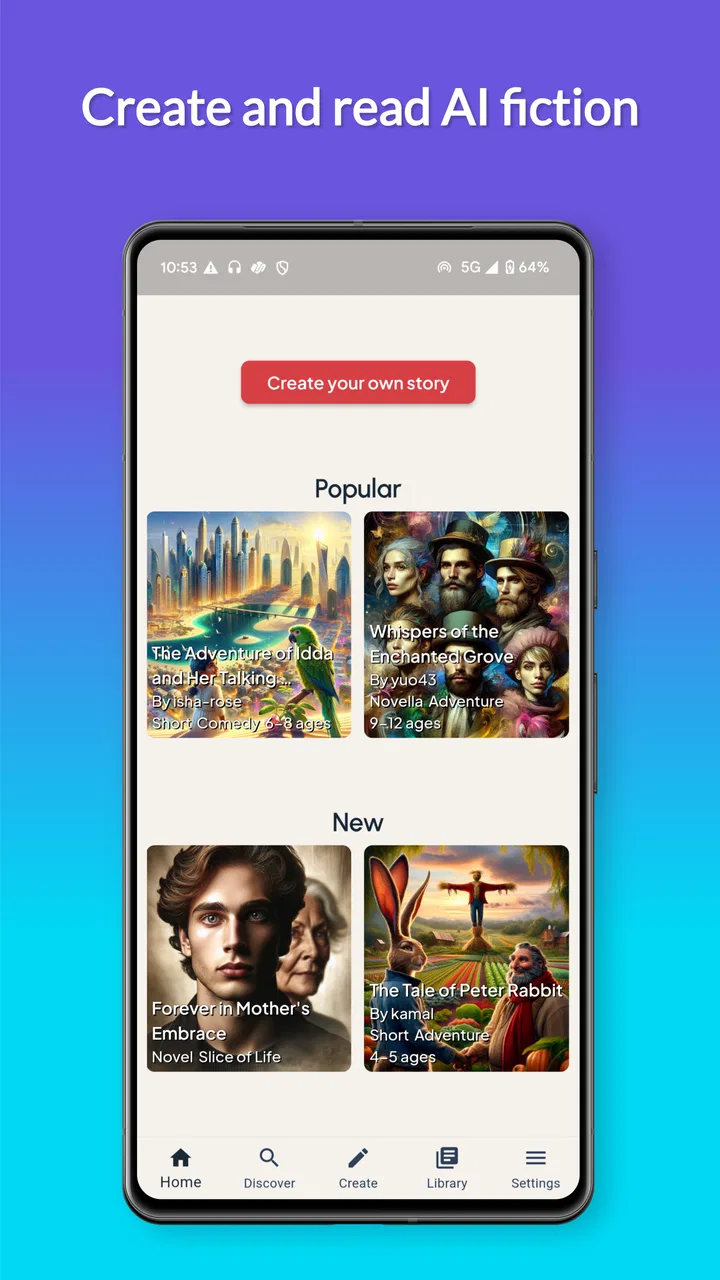
Okudu AI - Create Stories
- 4.2
- Rating
- 50.00K
- Installs
- Free
- Price

 Analysis by App-foxy
I opened Okudu AI - Create Stories expecting a quick way to turn a rough idea into something readable, but its appeal became clearer after I used it as part of a complete writing workflow. This free Books & Reference app from Okudu is aimed at people who want to create and read AI-assisted stories without being limited to one setting, cast, or genre. The basic promise is broad, yet the useful question is more practical: can it help when I have an idea but not enough time, structure, or confidence to develop it?
My answer is yes, with an important qualification. I see it as a creative starting point rather than a replacement for a serious writing application. It is most interesting when I treat the AI as a partner for exploration: I bring the premise, mood, characters, and boundaries, then judge what comes back and shape the next request. Readers who want instant entertainment may enjoy the novelty, while writers who expect precise continuity and complete editorial control will need patience.
From a half-formed idea to a readable story
I look at the handoff from a rough premise to readable prose as the key test: a useful result should give me something to judge, not just more text to scroll through. This section considers how I can keep that process focused by choosing a clear next step, then shifts to what happens when the idea grows into a more demanding session.
You May Also Like

 Blood Strike: 2.5 Anniversary
Blood Strike’s Loadouts Turn Every Drop Into a Tactical Gamble
A close look at Blood Strike’s custom loadouts: how fast access to signature weapons reshapes its battle royale rhythm, rewards preparation, and narrows the gap between fights.

 Pandora - Music & Podcasts
Pandora’s Music Is Easy to Start, but Harder to Recover
Pandora’s strength is its low-effort path from a seed to a station. Its weak spot is how much confidence it asks you to place in connection, setup, and quiet recovery.

 8 Ball Pool
8 Ball Pool Is Built on Rivalries, Rematches, and Routine
A close look at the rivalries, rematches, shared routines, and unanswered safety questions that turn a quick pool match into a persistent mobile community.

 Samsung Music
Samsung Music’s Quiet Strength Is Playing What You Already Own
Its reach comes less from spectacle than from dependable access to a personal library. That simplicity is both the app’s strongest retention engine and its ceiling.

 AccuWeather: Weather Radar
AccuWeather Review: A Quick, Clear Forecast for Everyday Decisions
For everyday plans, the best forecast is the one you can understand quickly. AccuWeather makes rain timing, radar, and local conditions easy to act on, with a few trade-offs.

 Hill Climb Racing
Why Hill Climb Racing Still Turns Crashes Into One More Run
A tiny car, a bumpy hill and one more upgrade: Hill Climb Racing keeps resurfacing because its simple chaos makes every near-miss feel personal.
More From Our News Desk
View All News


The starting condition matters more than I expected
The best way to approach this app is not with a completely empty prompt. I got more useful results when I began with a small but definite situation: who is involved, what has just changed, what kind of emotional tone I wanted, and where the scene should take place. “Write a fantasy story” leaves too much room for the app to choose the direction. A more focused premise gives the generated material something to hold on to.
That makes Okudu especially suitable for the familiar moment when a story is stuck before it has really begun. I might have a detective who finds an impossible letter, a teenager entering a city where memories are traded, or two friends meeting after years apart. The app can help turn that seed into a scene, but the quality of the handoff depends on how clearly I describe the seed in the first place.
I also found it useful to decide what I wanted before starting. Sometimes the goal is a complete short reading experience. At other times, I only need an opening, a character exchange, a plot complication, or several possible directions. Those are different jobs. Treating every request as “make me a story” wastes the app’s flexibility and makes it harder to recognize whether the result is actually useful.
Building the first request
The central attraction is the ability to work with any character, world, or genre rather than choosing from a narrow library of fixed templates. That freedom is valuable, but it also creates a responsibility for the reader. I have to supply the creative constraints that a traditional book, writing course, or structured story editor would normally provide.
For a stronger first attempt, I would include four things in plain language: the protagonist’s immediate goal, the obstacle, the atmosphere, and the kind of ending or movement I want. I would also say what to avoid. If I want quiet tension instead of action, a hopeful conclusion instead of a twist, or dialogue that feels casual rather than theatrical, that instruction belongs at the beginning.
A useful habit is to separate fixed details from flexible ones. The protagonist’s name, relationship, age range, and central problem may be fixed. The location of the next scene, the secondary character, and the exact complication can remain flexible. This gives the AI room to surprise me without allowing it to rewrite the foundation of the story.
The step-by-step flow in everyday use
Imagine that I have ten minutes before a train arrives and want to develop a science-fiction idea. I start with a courier who delivers messages between versions of the same city, then add one rule: every delivery changes one small detail in the courier’s own life. I ask for an opening scene with a restrained, slightly unsettling tone. That is a more workable starting condition than asking for a whole universe at once.
After reading the first result, I would not immediately request a longer version. I would inspect the response for the parts worth keeping. Perhaps the setting is vivid but the protagonist feels passive. Perhaps the central rule is interesting but the dialogue explains it too directly. I can then make the next request about that specific weakness instead of throwing away everything and starting again.
This is one of the strongest workflows for the app: generate, inspect, isolate, and redirect. The first output is not necessarily the finished product. It is a draft of possibilities. I get more value when I use each response to make a decision about the story rather than simply asking for more words.
For a longer idea, I would work in stages. First comes the premise and the cast. Next comes the immediate conflict. Then I would develop individual scenes and check whether each one moves the story forward. This staged method is less exciting than asking for an epic in one go, but it gives me more chances to correct tone, pacing, and character behavior before the story becomes difficult to manage.
Handoffs between my idea and the generated text
The most important handoff is from intention to instruction. I may know exactly what I want emotionally, but vague wording can produce a technically coherent scene that misses the feeling. Saying “make it sad” is weaker than explaining that the character is trying to sound practical while quietly realizing a friendship is ending.
The next handoff is from one generated passage to the next request. I would copy or restate the details that must remain stable instead of assuming the app will always preserve every nuance automatically. This is particularly important when several characters have similar motivations or when the story includes invented rules. A compact continuity note can save time: names, relationships, important objects, the current location, and what each person knows.
That approach also helps when I want to change direction without losing the useful parts. I can ask for the same scene from another character’s point of view, a less predictable ending, or a version with more emphasis on setting. The trade-off is that every new variation may introduce details that conflict with earlier material. The app gives me creative range, but I remain the editor responsible for deciding which version belongs to the story.
For readers, the handoff is simpler. I can move from creating a story to reading it as an audience member and judge whether the premise actually works without my prompting. That separation is valuable. A concept can feel brilliant while I am guiding it, then feel ordinary when read from beginning to end. Okudu makes it easy to test that difference because the creation and reading experiences sit close together.
What the result is good at
The strongest result is often momentum. When I am staring at a blank page, a generated scene gives me something concrete to react to. I may keep a paragraph, replace the dialogue, borrow the conflict, or discover that the original idea should become a mystery instead of a romance. Even an imperfect passage can perform useful creative work if it helps me make the next decision.
The app is also well suited to playful genre changes. A familiar situation can be tested as a thriller, a gentle fantasy, a comic adventure, or a more reflective literary scene. That makes it appealing to readers who enjoy imagining alternate versions of a premise, and to writers who want to compare tones before committing to one.
Another practical use is private experimentation. I can try a character voice that feels awkward to write myself, explore an unusual setting, or test a difficult scene without showing an unfinished draft to anyone. This lowers the cost of experimentation. The result may still need substantial rewriting, but the barrier to trying the idea is much lower.
Its audience size gives some context without deciding the experience for me. The app has a 4.2 average from around 1.6 thousand ratings and has passed 50 thousand installs, which suggests that it has found a real audience while remaining more specialized than a mainstream reading platform. I would take that as a reason to try it, not as proof that every generated story will suit my taste.
Where the workflow breaks
The same openness that makes the app creative can make it uneven. If I provide too little direction, the story may lean toward familiar patterns, explain its ideas too plainly, or resolve a conflict before it has earned the ending. That is not a defect I can solve with one magic prompt. It requires active editing and a willingness to reject material.
Continuity is another pressure point. In a short scene, a small inconsistency may be harmless. Across a sequence, however, a changed motivation, misplaced object, or altered relationship can weaken the entire narrative. My practical solution is to keep a short external note while developing anything longer. I would not rely on the generated text alone as the definitive record of the fictional world.
There is also a difference between novelty and depth. A surprising character or setting can make the first few paragraphs engaging, but a story still needs cause and effect, believable choices, and an ending that connects to what came before. Okudu can help me explore those ingredients, yet it does not remove the need to evaluate them. If I want a polished manuscript with rigorous revision tools, a dedicated writing app is a better companion.
The commercial side deserves attention too. The app is free to install, but in-app purchases range from $1.49 to $899.99 per item. That is a very wide range, so I would check the purchase screen carefully before committing to anything. Someone who only wants occasional creative experiments should be especially cautious about assuming that every part of an extended workflow will remain free.
The age label is Teen, which is a useful signal for families, although it should not replace personal judgment about the stories being created or read. Because users can work across many genres and themes, I would still preview material for younger readers and discuss whether the app’s open-ended creative direction is appropriate for them.
Who should use it, and who should skip it
I would recommend Okudu to curious readers, aspiring writers, role-playing groups looking for a quick premise, and anyone who enjoys turning a small idea into a narrative experiment. It is particularly helpful for the “I know the scene I want, but I cannot get it started” problem. It can also be a fun way to compare how one character or world changes when the genre changes around it.
I would be more hesitant to recommend it to someone looking for a carefully edited catalog of established books. This is not the same experience as opening a conventional reading app and choosing from professionally finished titles. The appeal is participation: I influence the material, evaluate it, and often reshape it.
It may also be the wrong tool for writers who need strict project management, manuscript formatting, detailed revision history, or dependable long-form continuity. A traditional word processor or specialist writing platform will usually offer better control for those tasks. Okudu works best beside such tools, not necessarily instead of them.
My practical method for getting better outcomes
I would begin with a one-paragraph brief, then ask for only the next useful piece. After each response, I would mark three things: what should stay, what should change, and what question the scene creates. This prevents the process from becoming an endless stream of loosely connected generations.
For character-driven stories, I would give each major character a private pressure or contradiction rather than a long biography. “Wants to leave but needs to be forgiven” is more actionable than a list of favorite foods and childhood memories. For world-building, I would define the rule that affects the scene immediately, then introduce additional background only when it changes a decision.
I would also ask for alternatives at turning points instead of accepting the first dramatic answer. Three possible complications can reveal which direction feels most natural. Once I choose one, I would return to a focused scene request and check whether the characters’ actions follow from what has already happened.
Finally, I would save the result outside the creative flow when it becomes important. That gives me a stable version to revise and compare. The app is excellent for movement and variation, but my own notes remain the safest place for the story’s final structure, especially when a project grows beyond a quick reading session.
Version, access, and overall value
Okudu is available as a free app in the Books & Reference category, with a minimum requirement of Android 7.0. The current version is 1.2.108, and it was released on January 28, 2025. Those details make it accessible to people using older Android devices, while the free entry point makes experimentation less intimidating.
Still, accessibility should not be confused with simplicity. The app is easy to understand at the concept level, but good results depend on a thoughtful exchange between the user and the AI. If I want a passive experience with no decisions, I may become frustrated by uneven passages. If I enjoy directing an evolving story, the same involvement becomes the main attraction.
After using it as a start-to-finish creative workflow, I see Okudu as a flexible story laboratory. It helps me cross the gap between an idea and a readable draft, offers room for unusual combinations of characters and worlds, and makes experimentation feel approachable. Its weak points are the familiar ones for open-ended AI writing: continuity needs supervision, first drafts can be generic, and the purchase range deserves careful attention.
My recommendation is to try it with a small, clearly defined story rather than committing immediately to a large project. Give the app a premise, guide the next scene, keep notes on the details that matter, and read the result critically. If you want creative momentum and enjoy shaping the outcome, Okudu AI - Create Stories is worth exploring. If you want finished books, strict editorial control, or a full manuscript workspace, I would choose a conventional reading or writing alternative instead.
FAQs for Okudu AI - Create Stories
01What is Okudu AI - Create Stories and what can I do with it?
Okudu AI - Create Stories is an artificial-intelligence storytelling app designed to help users create original narratives from their own ideas. You can generally begin with a prompt, theme, character, or genre and develop the concept into a longer story. It may be useful for casual entertainment, creative writing practice, bedtime stories, and experimenting with different plots, although the quality of each result depends on the instructions you provide.
02Is Okudu AI - Create Stories suitable for children?
The app may be appealing to children because it can turn simple ideas into imaginative stories, but parents should review the generated content and supervise younger users. AI-created text is not always predictable and can occasionally include mature themes, frightening situations, violence, or inappropriate language depending on the prompt. Check the app’s age rating, privacy settings, and terms before allowing a child to use it independently.
03Does Okudu AI - Create Stories require an internet connection?
Because story generation is normally handled by online artificial-intelligence services, an active internet connection is likely required for creating or continuing stories. Offline access may be limited to reading content that has already been generated or saved, if the app supports that feature. Users should also consider mobile data consumption and connection stability, particularly when generating lengthy stories or using the app frequently outside a Wi-Fi network.
04Is Okudu AI - Create Stories free to download and use?
The application may be available to download at no initial cost, but some features can be restricted by advertisements, usage limits, premium plans, or in-app purchases. Before generating many stories, review the pricing information shown in the Google Play Store or App Store and inside the application. Pay particular attention to recurring subscriptions, trial periods, renewal dates, and cancellation instructions to avoid unexpected charges.
05What privacy information should I consider before using Okudu AI - Create Stories?
Before using the app, read its privacy policy and the data-safety details listed on the relevant app store. Prompts, story ideas, account information, device data, or generated content may be processed by the developer or third-party AI providers, depending on the service. Avoid entering passwords, private conversations, personal identification details, or confidential creative material unless you understand how that information is stored and used.
Pros
- Turns simple prompts into personalized stories in seconds.
- Useful for sparking children’s creativity and family reading time.
- Story themes and characters can be adapted to different interests.
- Convenient format for creating new bedtime stories on demand.
- AI-generated tales can make reading feel more interactive and personal.
Cons
- Story quality may vary noticeably between different prompts.
- Some generated content may need parental review before children read it.
- Creative controls may feel limited for users wanting detailed customization.
- Frequent story generation could require an internet connection.
- The app’s appeal may decrease for readers who prefer professionally written books.

Okudu AI - Create Stories
Gallery